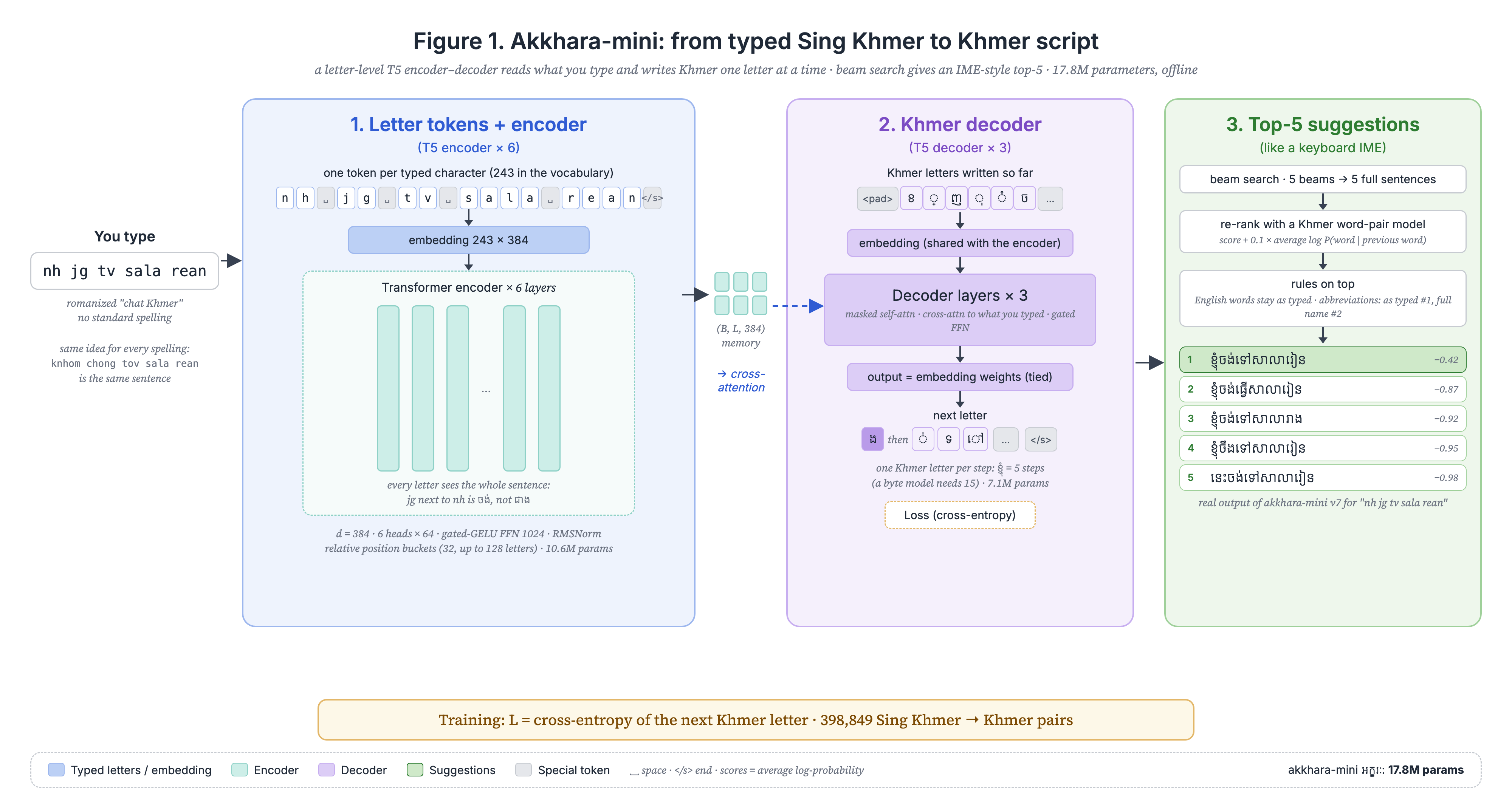
Akkhara reads the way you already chat (nh jg tv sala rean) and writes correct Khmer script:
ខ្ញុំចង់ទៅសាលារៀន. On your phone and your computer, without internet.
All versions use the same AI model, built into the app. Free and open source.
A full keyboard: Sing Khmer, ខ្មែរ (NiDA) and English, emoji, clipboard, dictionary.
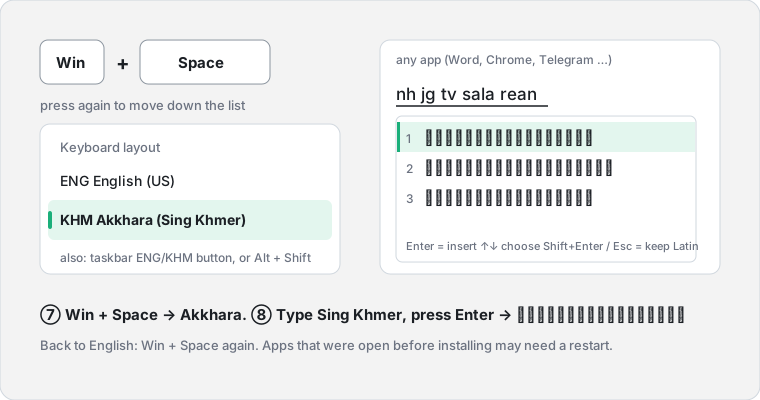
A real keyboard next to English. Win + Space → Akkhara, type in any app.
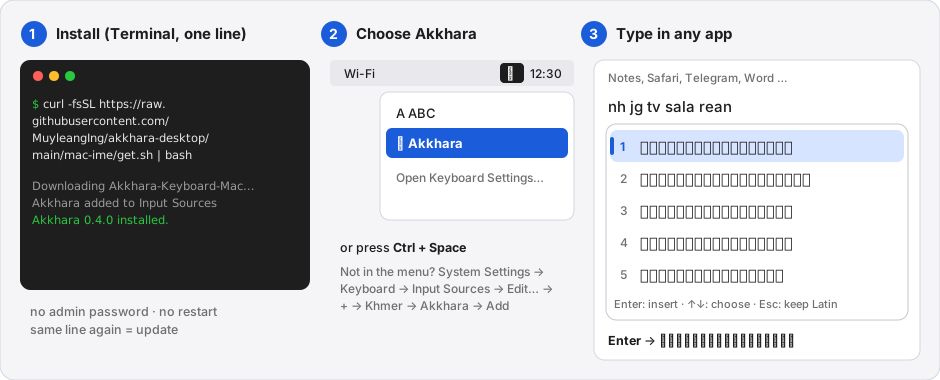
A real keyboard in Input Sources. Ctrl + Space → Akkhara, type in any app.
The iOS keyboard needs an Apple Developer account to reach the App Store. Help make it happen →
Sing Khmer has no standard spelling: knhom, knh and nh all mean ខ្ញុំ. Akkhara reads the whole sentence, so short words get the right meaning from their neighbours.
Your Latin stays underlined. Nothing changes until you choose.
A small model (18 MB) on your device writes the Khmer letter by letter and keeps the 5 best sentences, in about 10 ms.
Enter or tap inserts it. English words like bro or game stay English; names can be kept as typed.
| nh jg tv sala rean | ខ្ញុំចង់ទៅសាលារៀន |
| b pg lvol ot torn tomne te o | បងកំពុងរវល់អត់ទាន់ទំនេរទេអូន |
| sok sbay ot bro | សុខសប្បាយអត់ bro |
| tos jol CG | តោះចូល CG |
| b ng o | បងនិងអូន |
| nh ng tv | ខ្ញុំនឹងទៅ |
| nv ng | នៅហ្នឹង |
Akkhara comes from the Pali word akkhara: a letter, the written sign of a sound. In Khmer it lives on in words about writing: អក្ខរាវិរុទ្ធ (correct spelling) and អក្ខរកម្ម (literacy).
That is the whole idea: you type the sounds with Latin letters, Akkhara gives them back in អក្សរខ្មែរ, Khmer script, spelled correctly.
Akkhara is a small AI model that translates Sing Khmer (Khmer written with Latin letters, as in chat) into Khmer script, one whole sentence at a time.
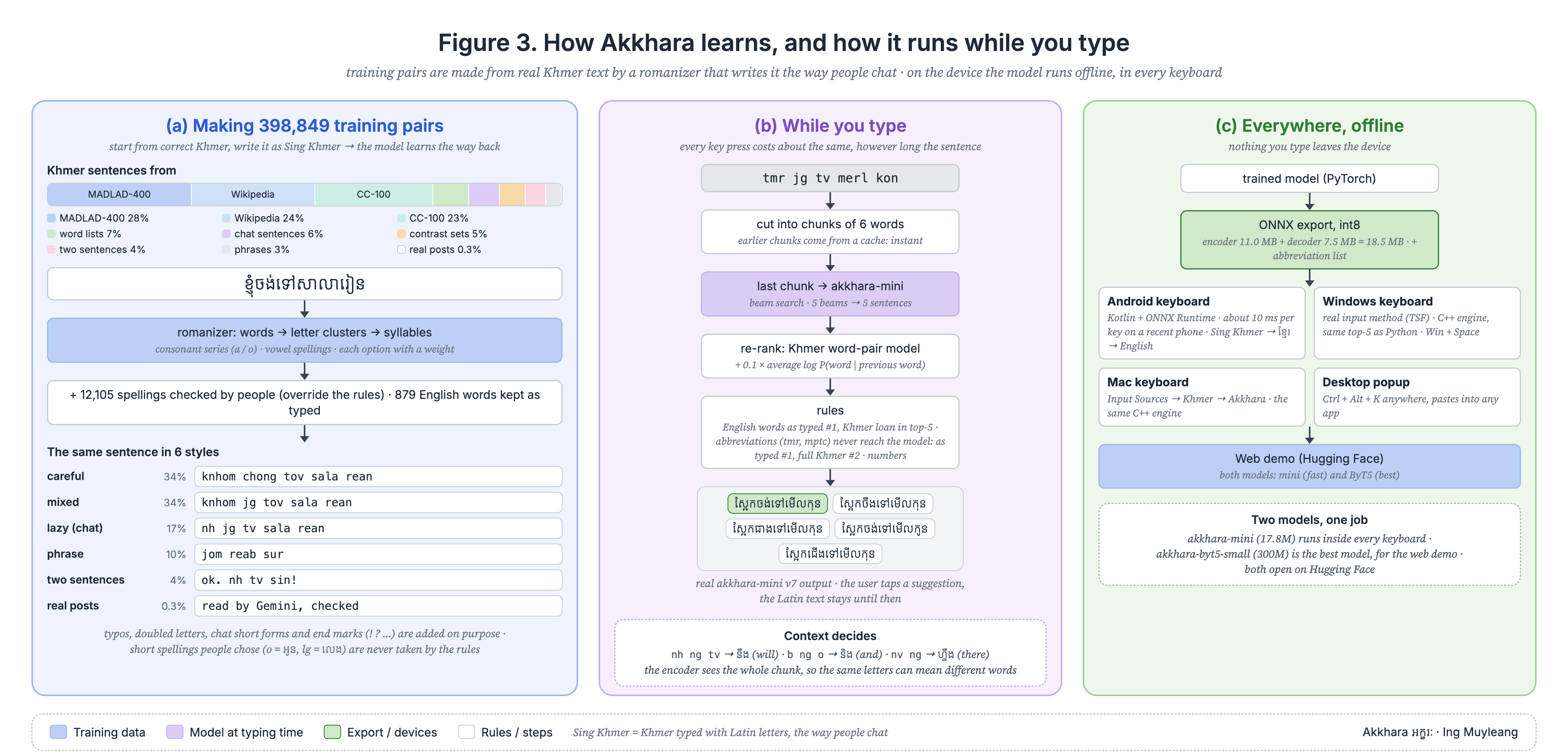
398,000 pairs of Sing Khmer → Khmer. Khmer sentences from Wikipedia and the web, romanized the many ways people really type (knhom / knh / nh), plus real chat checked by native speakers, 846 topic spellings, 134 Cambodian ministry, bank and university names, and common English chat words kept as English.
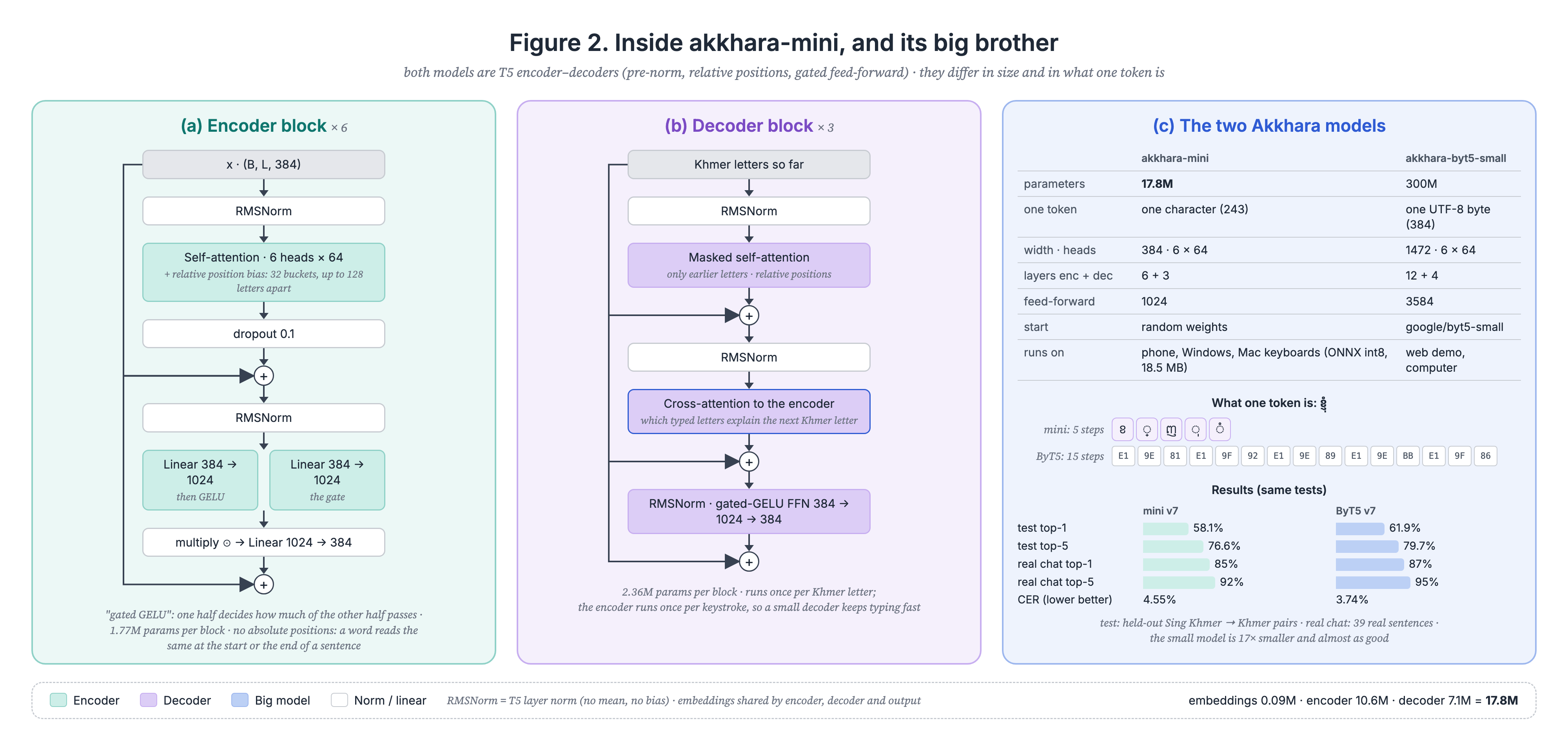
akkhara-mini: a character-level T5 encoder–decoder with 18 million parameters (6 + 3 layers). The encoder reads every Latin letter of the sentence; the decoder writes the Khmer one letter at a time and a beam search keeps the 5 best sentences.
Exported to ONNX and shrunk to 8-bit (18.5 MB). It runs inside the keyboard with ONNX Runtime on Android, Windows and Mac: about 10 ms per key, no internet. Long text is cut into 6-word pieces and finished pieces are cached.
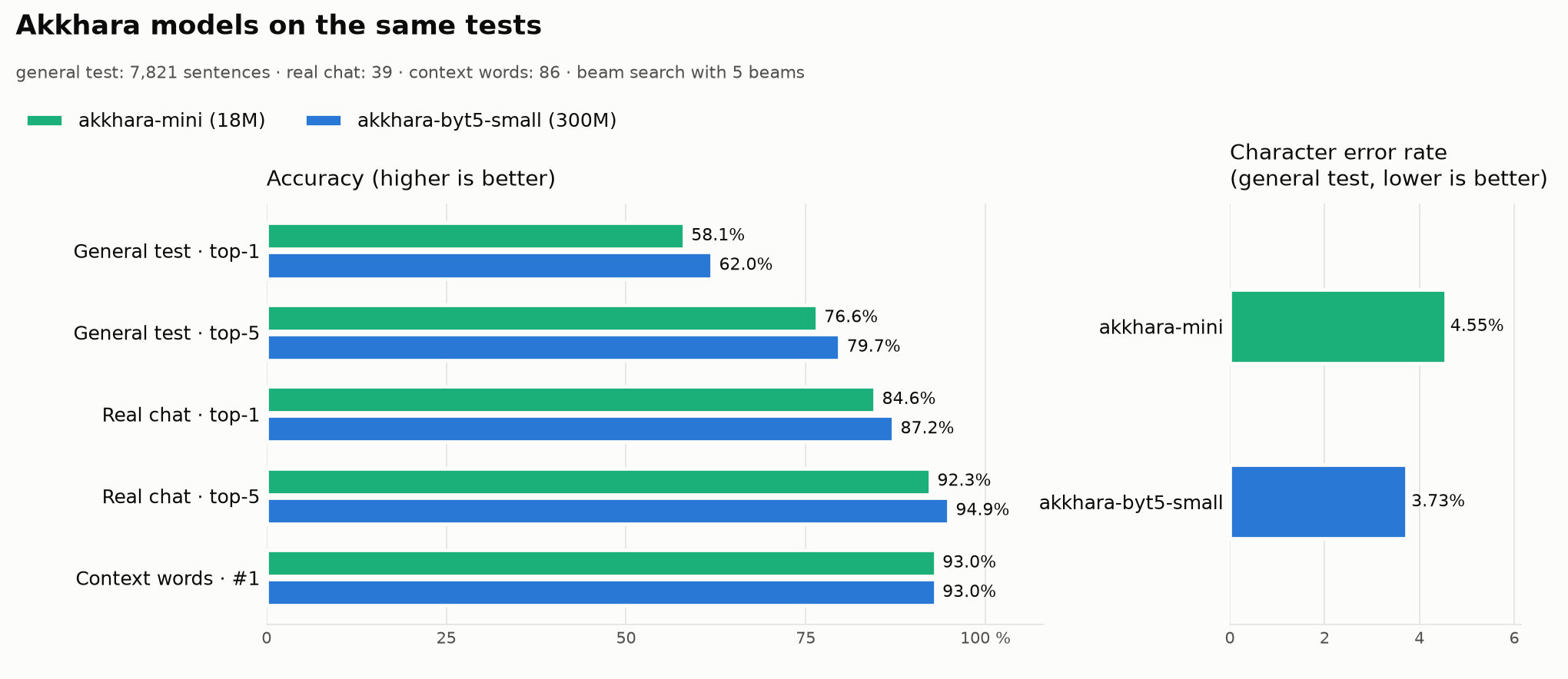
Short chat words have several meanings. ng is និង, នឹង or ហ្នឹង; yt is YouTube or យឺត. Because the model reads the whole sentence, it picks the right one (80 of 86 context tests).
mptc, rupp, cadt, istad, aba stay as typed at #1, and the full Khmer name is offered at #2: ក្រសួងប្រៃសណីយ៍និងទូរគមនាគមន៍.
akkhara-byt5-small (300M parameters) is the most accurate on formal text (CER 3.7%). It runs in the web demo; the phone and PC use the small one.
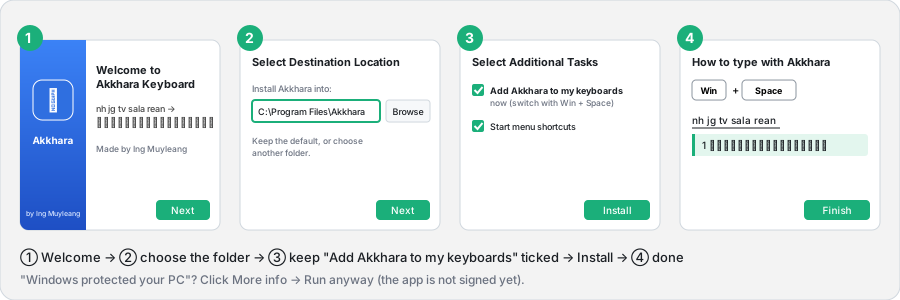
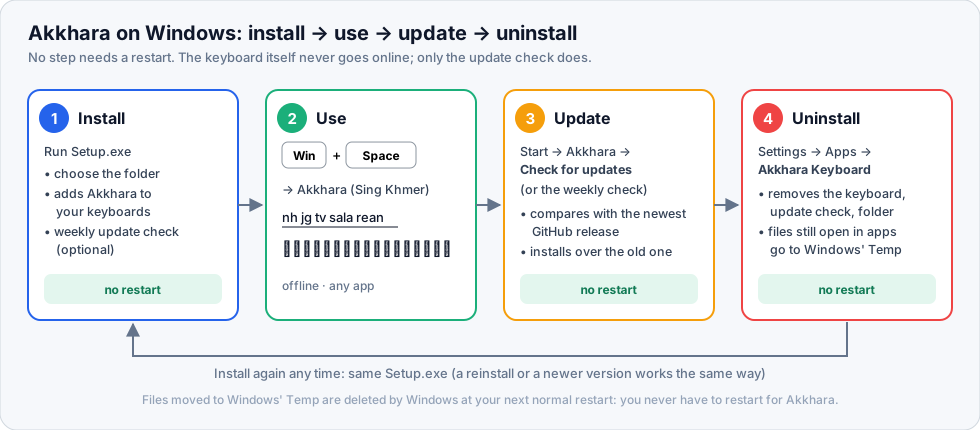
Setup adds Akkhara to your keyboards. Choose the folder or keep the default.
Start menu → Akkhara → Check for updates, or the weekly check if you ticked it in Setup. It compares your version with the newest GitHub release and installs it over the old one. Or simply run a newer Setup.exe. Only this check goes online; the keyboard itself never does.
Settings → Apps → Installed apps → Akkhara Keyboard → Uninstall. Akkhara is removed from your keyboard list, unregistered, and its folder and update check are deleted.
Open apps keep the keyboard file loaded, so Windows cannot delete it at once. Setup moves such files to Windows' Temp folder (allowed even while in use); Windows deletes them at your next normal restart. You can install again any time.
Apple M-series Mac, macOS 13.3 or newer. Open Terminal (⌘ + Space → "Terminal") and paste:
curl -fsSL https://raw.githubusercontent.com/MuyleangIng/akkhara-desktop/main/mac-ime/get.sh | bashMenu bar input menu → Akkhara (icon អ), or Ctrl + Space. Type nh jg tv sala rean: Enter inserts, ↑ ↓ choose, Esc keeps the Latin. Not in the menu? System Settings → Keyboard → Input Sources → Edit… → + → Khmer → Akkhara.
Update: run the same line again; it always takes the newest release. Uninstall: the same line with | bash -s uninstall at the end. No admin password, no restart, nothing left behind.
The app is not signed by Apple yet (that needs the paid Apple Developer account), so macOS blocks a zip opened from the browser. Files downloaded by Terminal are not blocked. Prefer the zip? Unzip it and run bash install.sh inside.
Use the models in your own apps, read the code, or help with real Sing Khmer spellings.
18M parameters, ONNX int8, runs on phones and laptops. Apache-2.0.
300M parameters, the most accurate on formal text. Apache-2.0.
Try both models in your browser, no install.
Kotlin + ONNX Runtime source code.
Windows keyboard (TSF, C++), Mac keyboard (InputMethodKit, Swift) and the desktop app.
380k Sing Khmer → Khmer pairs (access on request).
Akkhara is free and made by one person. Publishing on the stores costs money every year; your support pays for it.